
 Eiyeron Fulmincendii
86ed2bf97c
First shippable version?
Eiyeron Fulmincendii
86ed2bf97c
First shippable version?
|
8 년 전 | |
|---|---|---|
| readme_files | 8 년 전 | |
| sample | 8 년 전 | |
| textbox | 8 년 전 | |
| .gitignore | 8 년 전 | |
| README.md | 8 년 전 |
README.md
A Haxeflixel unnamed textbox library
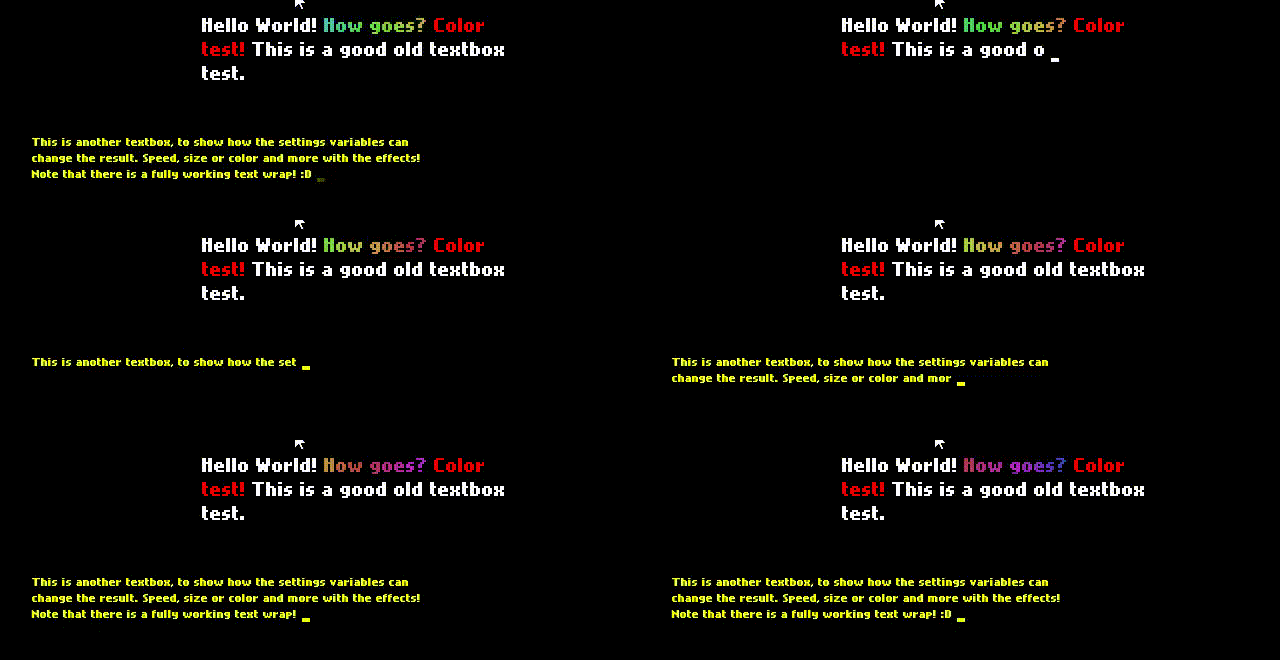
Features
- "Character-per-character"-style textbox for Haxeflixel.
- Correct word-wrapping : a being written word won't jump from a line to another if it's too big for the current line
- Per-character effects : allows you to have dynamic text.
- Extendable and customizable : There is a way to add new effects to your textbox, change the font, color, size, etc...
Usage
Installation
Include the library's root folder as classpath in your project node. Something like (as 2018-04-16)
<project>
  <!-- Here goes some of your configuration -->
  <classpath name="path to the library's folder." />
  <!-- Here goes some of your configuration -->
Now you should be ready and able to require classes such as textbox.Textbox.
Textbox functions
new (Float, Float, Settings): Creates a textbox where top-left corner is placed in (X,Y). Additional settings are stored in the given Settings object.bring (): activates the textbox and its process, making it appear in-game.dismiss (): deactivates the textbox and makes it disappear in-gamesetText (String): parses the string's content and prepares itself for the next use.continueWriting (): if the textbox is full, this function acknowledges it and asks the textbox to continue writing text (by moving up the text and writing in the newly empty last line)
Callbacks
NOTE : This is under WIP as it might change between versions.
Why callbacks?
Callbacks are useful as they allow you to extend the textbox without touching its logic. It allowed me to extract the textbox's logic from my now-dead project and make it easy to add features over it, features like effects, triggering a sound per character added to the box or change how it deals with the siutation when the textbox is full.
A few callback ideas (chaining boxes, sound-per-character, text character) are shown in the given sample project.
statusChangeCallback (Status): if the textbox's state changes, this callback is called. Here a list of the expected behavior to be notifed of:FULL: the textbox is full. Coupled withcontinueWritingyou can make stuff like waiting a button press to resume writing.DONE: the textbox finished writing its content. You candismissit or set it with new text.
characterDisplayCallback (textbox.Text): This callback is added each time a character is added to the box. Use this if you need features like an audio sample played for every character, a text cursor following the input, etc etc...
Settings object
typedef Settings = {
font:String,
fontSize: Int,
textFieldWidth:Float,
color: FlxColor,
?numLines:Int, // Default is currently 3
?charactersPerSecond:Float, // Default is currently 24
};
Text effects
This textbox allows for per-character effects such as (but not limited to) coloring text or making an animated rainbow. Those effects are enabled and disabled by in-text code sequences that are small and human-writable.
Code sequences and effects.
Usage example
var textbox:Textbox = new Textbox(...);
textbox`.setText("
I'm enabling effect n°00 with arguments (0x00, 0x00, 0x00) : @001000000
I'm disabling effect n°05  @050
I'm enabling multiple effects : @0010A0C0E@0510DCCDE...
It even works inside wo@001000000rds, even if it's a bit unreadable...
");
Enabling an effect
    @MM1AABBCC
    ▲│  │ │ │
    └┼Sequence start ()
     │  │ │ │
     └ Effect n° 0xMM
        │ │ │
        │ │ │
        └ Argument 1 : 0xAA
          │ │
          └ Argument 2 : 0xAA
            │
            └ Argument 3 : 0xAA
Disabling an effect
    @MM0
    ▲│
    └┼Sequence start ()
     │
     └ Effect n° 0xMM
Note : The 0 or 1 between the effect index and the first argument indicates the textbox parser to disable or enable said effect
Create new effects
NOTE : This is under WIP as it might change between versions.
To add an effect to the effect list, you have to create a class implementing IEffect and add it to TextEffectArray's effectClasses variables. Two effects currently are already implemented : coloring some text and an animated rainbow effect. The effect's position index in the array will be it's code sequence's ID.
Effect interface
reset(Int, Int, Int, nthCharacter:Int):Void: called when the effect is enabled on a character. (It's named reset as an effect can be set multiple times.)update(Float): the good old classic update function, called by the textbox on aFlxState.update()tick or manual update.apply(Float): called on a character's own update function to update the character's look if needed.setActive(Bool)/isActive():Bool: (WIP) implement those to correctly manage the effect's activated's state. A simple get/set is enough.
Roadmap
The library's pretty much functionnal and gives the barebones features as now (the current effects comes from my dead project as freebies). Here's a non-exhaustive list of what could be added or changed to make the users' life easier :
- Change the callback types into arrays or a class that acts a bit like C#'s delegates.
- On JS, there is a quirk on how to calculate a space's width and a custom value is set instead. Maybe make this variable part of the settings class.
- Implement helper classes such as a status icon or a "Press a button to continue" helper class.
- Add more effects
- Add more examples
- Document the code as well as this file?
- Unit testing. (As of now I've been using my own project and the sample as testing content but formalized unit testing would be nice to have)